Viber è un programma di messaggistica istantanea relativamente nuovo rispetto ad altri come Skype, WhatsApp o LINE, ma comunque popolare.
Se conosci qualcuno che spende troppo tempo su Viber, allora FlexiSPY e la sua funzionalità di intercettazione per Viber ti permetterà di vedere subito cosa stanno combinando su Viber.
Spia le Chat di Viber su iPhone – Iniziamo
Step 1 – Fai Login sulla tua Dashboard di FlexiSPY
Step 2 – Clicca la finestra Messaggi e seleziona IM e Viber
Step 3 – Visualizza le chat di Viber raccolte da FlexiSPY
Fatto
Speriamo che dsa questo articolo trapeli quanto sia potente FlexiSPY quando si tratta di spiare un iPhone. Ma c’è molto altro di cui FlexiSPY è capace oltre a intercettare le chat di Viber!
Resta connesso per leggere altri articoli esplicativi su come usare ogni funzionalità di FlexiSPY.
Pensavi che i geni della Apple avessero reso iMessage impossibile da crackare? Anche noi, dopotutto, l’Apple ha dichiarato più volte che iMessage è impenetrabile, inviolabile – a prova di manomissione. A quanto pare la Apple stava straparlando. Sono stati smentiti quando l’attenzione dei media internazionali è stata catturata dalle capacità di spionaggio della NSA – tsk…tsk.
Non devi diventare un agente segreto per spiare con successo
Non possiedi nessun super potere da spia? E invece sì! Infatti, gli utenti del software spia per cellulari FlexiSPY stavano già godendo dei benefici di intercettare iMessage ben prima che la NSA entrasse in gioco. Qual è il lato negativo nell’avere questi fantastici super poteri? Devi chiedere a te stesso questa importante domanda.
Sei iscritto a FlexiSPY?
Ok, partiamo pure dal presupposto che questa guida preferisce FlexiSPY. Perché? Perché è una macchina da spionaggio che spacca, di cui siamo molto fieri, ed è l’unico prodotto che funziona esattamente come dichiarato. Se non hai FlexiSPY installato sul telefono che vuoi monitorare, peggio per te – se non l’hai ancora fatto, acquista FlexiSPY, installalo sul cellulare che vuoi spiare, poi ritorna qui e finisci di leggere questa guida. Se hai già installato FlexiSPY, allora leggi i 3 semplicissimi passaggi per spiare iMessage qui di seguito.
Step 1 – Fai Login sulla Tua Dashboard
Step 2 – Entra nella Sezione di iMessage
Step 3 – Visualizza i messaggi raccolti
È Tutto!
Resta connesso per altri articoli che spiegano chiaramente come può aiutarti FlexiSPY.
Per non avere mai sentito parlare di WhatsApp devi aver vissuto sulla luna. WhatsApp è un’alternativa fortissima agli SMS che sta DAVVERO prendendo piede. Guardando le statistiche, WhatsApp è stata la #1 applicazione a pagamento in oltre 131 mercati a livello mondiale, e la sua influenza è ancora una presenza onnipresente nell’universo delle applicazioni per messaggistica di oggi.
Viene da pensare che con una bacino di clienti simile (circa 350 milioni di persone) la sua sicurezza sia impenetrabile. In effetti è decisamente buona, e ha costituito una sfida per il team di FlexiSPY, ma solo per un po’. FlexiSPY è riuscita a capire come forzare WhatsApp e abbiamo inserito una funzionalità di spia per WhatsApp DIRETTAMENTE IN FlexiSPY Suite per Android e iPhone, sia PREMIUM che EXTREME. Dopotutto, con così tante persone che usano WhatsApp sarebbe un peccato non poterla spiare.
Come Spiare le Chat di WhatsApp su Android
Hai Bisogno di Tre Cose
Avere il loro smartphone Android in mano
Il Software Spia per Cellulari FlexiSPY
15-20 minuti del tuo tempo (a seconda della tipologia/modello del loro smartphone)
Una volta assicurato di aver soddisfatto tutti i requisiti elencati di FlexiSPY, sarai pronto per iniziare a leggere le chat di WhatsApp di altre persone.
Iniziamo!
Step 1 – Metti le mani sul loro smartphone Android e assicurati che sia un modello supportato da FlexiSPY.
Se hai qualsiasi domanda su questo tutorial, contatta il disponibile staff di supporto di FlexiSPY che sarà felice di assisterti.
Step 2- Installa FlexiSPY sul loro smartphone Android e attivalo.
Step 3 – Aspetta circa un’ora che FlexiSPY raccolga tutte le chat di WeChat sul loro smartphone. FlexiSPY caricherà automaticamente i dati sulla tua dashboard online.
Step 4 – Sul tuo computer accedi alla dashboard di FlexiSPY.
Step 5 – Clicca sulla sezione Messaggi e seleziona IM e poi WhatsApp.
Step 6 – Tutte le chat di WeChat raccolte da FlexiSPY saranno elencate per poter essere visionate.
Fatto
Se hai apprezzato questo articolo, potresti trovare interessante Come Spiare le Chat di WeChat su Android. Oppure, se hai delle domande su questo tutorial o su una qualsiasi delle funzionalità di FLexiSPY, non esitare a lasciare un commento qui sotto, contattarci via social media o scriverci sulla
Live Chat!
Resta connesso per leggere altri articoli di questa serie che spiegano come usare ogni funzionalità di FlexiSPY.
WeChat è un’app di messaggistica uscita nel Gennaio 2011, quando fece il suo debutto in Cina sul mercato degli SMS per poi esplodere sulla scena internazionale. Con più di 15 lingue supportate e 100 milioni di utenti nel mondo – si è rivelato un enorme successo, tuttora in crescita. Una popolarità in gran parte dovuta alle incredibili funzionalità offerte dall’app, quali: sticker, messaggi vocali, video chiamate, e Discover, che ti permette di localizzare via gps le persone vicine a te.
Nonostante WeChat sia usato principalmente da adolescenti e giovani adulti, il mercato è ancora vasto per le persone della nostra generazione, e audience più maturi stanno iniziando ad adottare WeChat come mezzo essenziale di comunicazione per la vita di tutti i giorni. Come mostrano i dati, praticamente chiunque inizierà presto a usare WeChat, o quanto meno avrà provato. Per questo, se non lo stai monitorando, che sia per bambini, adolescenti, dipendenti, tuo marito o moglie, allora stai perdendo molto.
Come Spiare le Chat di WeChat su Android
Di Cosa Hai Bisogno
Avere in mano il loro smartphone Android
Il Software Spia per Cellulari FlexiSPY
15-20 minuti del tuo tempo (a seconda della tipologia/modello del loro smartphone)
Una volta assicurato di aver soddisfatto tutti i requisiti elencati di FlexiSPY, sarai pronto per iniziare a leggere le chat di WeChat di altre persone.
Iniziamo!
Step 1 – Metti le mani sul loro smartphone Android e assicurati che sia un modello supportato da FlexiSPY.
Se non sei sicuro puoi contattare il disponibile staff di supporto di FlexiSPY che sarà felice di assisterti.
Step 2- Installa FlexiSPY sul loro smartphone Android e attivalo.
Step 3 – Aspetta circa un’ora che FlexiSPY raccolga tutte le chat di WeChat sul loro smartphone. FlexiSPY caricherà automaticamente i dati sulla tua dashboard online.
Step 4 – Sul tuo computer accedi alla dashboard di FlexiSPY.
Step 5 – Clicca sulla sezione Messaggi e seleziona IM e poi WeChat.
Step 6 – Tutte le chat di WeChat raccolte da FlexiSPY saranno elencate per poter essere visionate.
Questo è quanto.
Il team di FlexiSPY ha fatto in modo di rendere l’arte dello spionaggio estremamente intuitiva, ma se dovessi incontrare qualsiasi problema con una delle nostre funzionalità, sentiti libero di contattarci sulla nostra livechat, i nostri social media o nella sezione per i commenti sottostante: siamo sempre qui per aiutarti!
Ci auguriamo che questo breve articolo abbia reso quanto sia potente FlexiSPY quando si tratta di spiare uno smartphone Android.
Le chat di WeChat sono solo una parte del materiale che FlexiSPY è in grado di raccogliere, resta connesso per leggere altri articoli di questa serie che spiegano come usare ogni funzionalità di FlexiSPY.
Usa questa parola in qualsiasi frase e è sicuro che attirerà l’attenzione. Infatti, “FlexiSPY gratis” o “Spia per cellulari gratis” sono tra le parole più ricercate sul nostro sito.
Cosa significa? Queste persone sono solo degli scrocconi o c’è dell’altro?
Possono esserci molte ragioni, ma pensiamo che alcuni fornitori di spie per cellulari disonesti abbiano reso diffidenti le persone verso l’intera categoria. Per questo abbiamo deciso di dimostrare ai clienti che FlexiSPY è una marca fidata quando si tratta di monitorare dispositivi mobile.
Offriamo così la licenza di un giorno per FlexiSPY EXTREME, completamente gratis, senza carta di credito. Tutto quello che chiediamo in cambio è che tu ci aiuti a diffondere la parola su Facebook, Twitter o Google Plus.
La licenza ha una durata di 24 ore, durante le quali potrai valutare il nostro prodotto e servizio clienti. Quando a licenza scade, puoi decidere se continuare acquistando FlexiSPY EXTREME o PREMIUM. Non dovrai neanche reinstallarlo, grazie alla tecnologia Upgrade Anywhere.
Non importa che tu sia rimasto fregato da mSpy, imbrogliato da Stealthgenie, o deluso da mobisteath: se stai cercando di intercettare un cellulare, di spiare un iPhone o un Android, o di spiare un iPad, prova FlexiSPY EXTREME gratis.
Discutine Sulla Nostra Chat Live e Inizia
Many spyphone vendors, including FlexiSPY advertise call recording for Android, but what is it, and why does FlexiSPY not recommend it?
To recap, Android local call recording is where you set a recording schedule from inside a dashboard, and a TARGET Android device will then start recording calls or surroundings and save them locally to the device.
At some point later, the recording is sent to the server where it can be listened to.
So why does FlexiSPY not recommend this? The answer has many parts.
Firstly, setting a schedule for environmental recording is essentially a blind exercise. Unless you know that something interesting is going to happen, the results will not likely be useful. Who wants to hear a toilet flush, or the sound of the TARGET’s legs rubbing against the device?
A much more useful scenario is to be able to listen in at will, and if something interesting is happening, then invoke the recording. Only FlexiSPY can offer this, because we recommend spycall to first listen, and then record, using the FlexiRECORD option if things sound juicy.
Unfortunately this is not possible with Android local call recording.
Secondly, and what most vendors WON’T tell you, is that the Android Local Call Recording technique is inherently unstable and is extremely platform dependent. You will find that mostly it does not work, or if it does, you only hear one side of the conversation. This limitation also applies to FlexiSPY, however, we have a unique call interception system that works on Blackberry, iPhone, Android, and Nokia Belle.
With the addition of the FlexiRECORD product, all call recordings are automated and saved to PC.
We suggest to our customers to try the Android local call recording first, and if that does not meet their needs, we can provide a full or partial refund, or a discount on FlexiRECORD.
FlexiSPY currently offers Android local call recording as part of its EXTREME product, but as its viability has decreased, we will be offering this feature as part of PREMIUM in the very near future.
Summary of Android local call recording Issues
1. Local call recording is for Android only
If the TARGET device you whose calls you want to record is not an Android phone then unfortunately local call recording is not available as it only works on Android phones only.
2. Local call recording works better on some Android phones than others
The performance of local call recording on an Android phone varies from model to model. There is no uniform standard. This means that it may work well on one Android phone but not so well on another.
3. The quality of the local call recording will vary depending on Android handset.
Android devices are exceedingly customizable and this means it is problematic to have local call recording work correctly on every single version of every Android handset. We already mentioned that call recording performance is dependent on Android model but what does this mean and why?
When you perform local call recording you essentially want to record both sides of the conversation. This would be the TARGET device and the person that they are currently talking to when the local call recording takes place.
Unfortunately, whilst it may sound easy to record two sides of a conversation and then upload it it really does depend of a certain number of factors which include but are not limited to:
Android OS version running on the phone
Android phone make and model
Furthermore, when you do record a call and it gets uploaded to your online account the factors above all contribute to the quality of the recording and the recording will be in one of three states.
You hear both sides of the conversation
You hear only the TARGET devices side of the conversation
You hear only the third party’s side of the conversation
This means that local call recording is essentially a lottery in terms of how well it will record calls and the quality of the recording because of the sheer amount of differing Android phones and Android configurations available.
So what can you do to ensure that you hear both sides of the conversation at all times and that you can record the conversations of any kind of TARGET phone, not just an Android phone?
FlexiRECORD is a companion product to FlexiSPY Extreme. In order to operate it you need the following:
A TARGET device running FlexiSPY Extreme
A PC
Your own Android phone
You install FlexiRECORD on to your PC and your own Android phone. You then access FlexiRECORD on the PC and enter the details of FlexiRECORD on your Android phone. With those details in place you simply leave your PC and your own Android phone connected to FlexiRECORD at all times and whenever the TARGET device makes or receives a call using FlexiSPY Extreme FlexiRECORD will automatically record it and save it to your PC so you can listen to it later.
Recording calls with FlexiRECORD has numerous benefits.
You can record calls from any TARGET device – not just Android phones
You always record both sides of the conversation
Recorded calls are saved as MP3 not AMR which means better quality
FlexiRECORD also allows you to record ambient surroundings as well and even remotely control the TARGET phone running FlexiSPY Extreme directly from your own computer.
So if call recording is something you really want out of spy phone software don’t be content with local call recording now that you know its limitations get FlexiSPY Extreme and FlexiRECORD today to see the true power of call recording.
You are about to find out why mobile spy’s undetectability claims don’t protect you from being discovered. We’ll show you the three places on an iPhone where mobile spy can be seen, and why using their app will likely get you found out.
This article shows results of a test we conducted to verify claims by mobile spy that their software cannot be seen anywhere on the target phone while the app is running. We give you the facts so you can come to your own conclusion about which mobile monitoring software—mobile spy or FlexiSPY—was designed around assuring you will never be discovered monitoring a mobile device.
We explain exactly how the tests were carried out using a publicly sold copy of mobile spy installed on an iPhone 4 and a 5s.
We’ll compare the anti-detection effectiveness of both FlexiSPY and mobile spy head-to-head, to demonstrate why FlexiSPY is the best-choice mobile monitoring app for anyone who wants to stay hidden.
mobile spy’s actual claim to invisibility
Looking at screen grab below you can read mobile spy’s own words on their website telling you their software is 100% undetectable. Though “complete stealth” might sound reassuring, there are a few other mobile monitoring red flags on the target phone that will give you away, and which are not mentioned anywhere on the site.
mobile spy claims to operate in “complete stealth”
Yes, mobile spy can accurately claim their app’s icon isn’t seen on the target phone, but they don’t mention other serious discovery risks of any mobile spy app that will invite suspicion and get you found out.
Where To Find mobile spy On An iPhone
Before getting into how we found mobile spy during our test, let’s first discuss some important points about the iPhone’s design. Spyphone developers have to look at these areas carefully if the application is to operate undetected.
First there are the Permissions Settings, and the second is what happens on the target phone based on if it is jailbroken or not. Before installing any mobile monitoring software on an iPhone, you have to get full access to the operating system, this is done by a procedure called “jailbreaking”, so you can install whatever programs you wish.
Later in the article we’ll tell you why jailbreaking a phone is one of the easiest ways to reveal a spyphone app, but for now let’s explore the risks found in Permissions.
How Permissions Defeat Invisibility
When an application that’s running on an iPhone is required to send data, use GPS or open the microphone, it must “ask” permission from the phone’s operating system.
You can see these permission requests in the iPhone Settings menus shown here:
Each menu displays the name of the app which is requesting permissions, something which will quickly reveal that a spy app is running on the iPhone.
Take a look at this screen grab below showing what happened when we activated the ambient listening feature on our copy of mobile spy. The program’s permissions request popped up in the microphone menu, offering a clear sign on the target phone that it is being remotely controlled.
Figure 3- mobile spy asking for microphone permissions and appearing in the microphone menu.
But mobile spy’s invisibility issues don’t stop at the mic.
When mobile spy is asked to locate the target phone, it uses the phone’s GPS, triggering another tell-tale permissions request. The image below of mobile spy appearing in the Location Services menu shows how easily their software reveals itself on the target phone.
As you can see, mobile spy makes itself visible simply by performing routine functions necessary for using some of the app’s most important features.
But as obvious as these undetectability breaches may seem, mobile spy offers an even easier way to uncover its presence on the target phone.
Jailbreaking | The Invisibility Spoiler
mobile spy asks for location services permissions after installation and is then visible in the location services settings menu.
Earlier we told you that it’s necessary to jailbreak an iPhone before installing any new software, and here’s why that’s important to know: when you add any new application to an iPhone, you should be aware of its starting state—either Not yet jailbroken or Already jailbroken.
After you install monitoring software on the target phone you have to be sure that there is no revealing trace of internal changes you have made. One such glaring change occurs whenever you jailbreak a cell phone: an icon called “Cydia” suddenly pops up in the app directory.
So for a spy phone app to remain undetected you need to make sure that:
– No Cydia icon is visible if the target phone was not jailbroken before.
– No Cydia upgrade notifications or suspicious installation packages are displayed if it was already jailbroken
Target Phone Not Jailbroken | Watch For This
When you install spy phone software on a target device that hasn’t been jailbroken before, the sudden appearance of the Cydia icon is likely to arouse suspicion of the app’s presence.
When you install mobile spy, the Cydia icon is at first clearly visible in the app directory, and disappears once the software has been activated. However to access the instructions for doing this you have to open Cydia and search mobile spy’s 47-page user guide.
Already Jailbroken | This Happens
.
On an already jailbroken target phone, the Cydia icon will already be a familiar sight and won’t raise any red flags, but the Cydia Upgrade Notification that appears when mobile spy is installed is sure to cause suspicion. And this is what happens when you install mobile spy.
The image below shows the Cydia upgrade listing along with a clearly visible upgrade bubble and a suspicious installation package which is mobile spy that will quickly reveal your monitoring activities.
No matter how many times you upgrade Cydia, that glaring red bubble will never go away. And to completely remove the mobile spy app you just open Cydia and tap Modify and then remove it.
The Facts Tell It | mobile spy Can Be Detected
On their website mobile spy sums up the app’s invisibility in two words: “complete stealth”. But as we found through using the software, this promise does not include protecting you from being discovered.
While mobile spy does allow you to hide the Cydia icon it’s not a very convenient process. And even when Cydia is hidden, other serious stealth threats remain.
mobile spy customers are advised to scrub all traces of Cydia from their target phone, especially suspicious update requests and unremovable notification bubbles.
You can go here to find out how FlexiSPY eradicates all traces of Cydia with just one click.
You may be wondering why there are no FlexiSPY screen shots posted in this article. Not that we have something to hide—we just have nothing to show on this topic. Since FlexiSPY is designed to be invisible everywhere on a target phone, it simply doesn’t show up after being installed.
mobile spy Is Detectable On An iPhone 3 Ways
You—like most folks who want to monitor an iPhone—are doing it to help with a problem, but it will be left unsolved and continue to cause grief if you get discovered. FlexiSPY was conceived and developed with keeping you invisible a top priority. This means your absolute concealment is a core function of our software, literally by design.
So if you’re looking for powerful and reliable iPhone monitoring capabilities plus the proven knowledge you will never be discovered, you can believe promises or benefit from the facts: FlexiSPY keeps you hidden always and everywhere.
This means that this already solves the issue of what to do if the phone was not previously jailbroken before purchasing the spy phone software.
FlexiSPY however remains 100% undetected. We are so confident that it cannot be found on an iPhone after installation that we do not need to advertise that it is completely hidden. But this just goes to show that if you want the best spy phone and you want something 100% undetectable then FlexiSPY is it. It is still the only spy phone software that cannot be found once installed on an iPhone. It also gives you complete power over the visibility of Cydia as well.
Analysis
iPhone spy software will appear in one of three main locations once installed on an iPhone. We show you how to find it even though the software may be advertised as being completely hidden.
Settings > General Location services
It will appear here because the spyphone software needs permission from the operating system to get the device location for you to spy on it. The majority of spy phone software that claim that they are undetectable are usually found here.
When it comes to FlexiSPY vs. mobile spy it was mobile spy that appeared in this menu.
Settings > Cellular
It will appear here because iPhone spy software needs the internet on the phone to upload data to the online account for you to view. This means that there may be times when wifi is not being used to do this. When this happens the phone uses cellular data which is more commonly known as 2G or 3G or 4G. As with location services, the application needs permission from the operating system (iOS) so that the data it collects can be uploaded for you to view. This means it may appear in this menu.
When it comes to FlexiSPY vs. mobile spy neither were listed in this menu.
Settings > Microphone
This is a unique one. Spy phone software will appear here if they use the microphone. This can be for call recording or ambient recording – any feature that uses the microphone. As you know FlexiSPY offers ambient recording for iPhone but still is hidden from this menu.
mobile spy also offer ambient recording and also manage to hide themselves from appearing in this menu.
In terms of FlexiSPY vs. mobile spy spy phone software only has to appear once after it has been installed and already any claims about being undetectable are worthless.
You may be wondering why there are no screenshots with FlexiSPY shown and that is because only mobile spy is visible. When it comes to being undetectable on an iPhone and if you are looking for the best cell phone monitoring software then clearly FlexiSPY rules supreme for providing a great list of features married to software that really is 100% undetectable.
Appendix
We’ve listed below detailed specifications of both FlexiSPY and mobile spy applications used in our test:
The specifications of both FlexiSPY and mobile spy
Stay tuned for further blog pieces as we face-off FlexiSPY against all other major spy phone competitors to show that, when we say FlexiSPY really is the best spy phone software and really is 100% undetectable once installed, we have the evidence to prove it.
You can see how FlexiSPY stacked up against the remaining competitors for software visibility by clicking the links below.
This article shows why stealthgenie’s claim of stealth doesn’t guarantee you’ll stay hidden — and also shows the two ways that stealthgenie can be discovered on an iPhone
What you are about to read is the result of tests carried out to verify claims by stealthgenie that their product is 100% undetectable to the person using the monitored cell phone. We put their words to the test – along with similar claims by other manufacturers – and let the facts show which cell phone monitoring software actually delivers on the promise to protect customers from being detected.
We take you through the procedure and examine the results as we test a commercially available copy of stealthgenie for invisibility on both an iPhone 4 and 5s.
We also compare the anti-detection capabilities of both FlexiSPY and stealthgenie with a side-by-side test that clearly demonstrates why FlexiSPY is the best mobile monitoring software for those who want to stay invisible at all times.
stealthgenie’s Claim: Their Software Stays Hidden
stealthgenie advertise that their software is 100% hidden
Strictly speaking, their claim is true: stealthgenie’s software app icon can be hidden on the target phone. But what isn’t mentioned are the side effects that a mobile spy app causes that will attract attention and cause you to be detected.
How to find the stealthgenie spy application on an iPhone
To help you quickly understand how we uncovered stealthgenie, there are two important things you need to understand about the iPhone’s design. These things must be carefully considered by the spyphone developer if the application is to remain completely invisible.
The first is the Permissions Settings, and the second is the impact of the starting state of the device at the time it is jailbroken.
If you’re not already familiar with this term here’s the general idea: Before installing any mobile monitoring software on an iPhone, you have to “jailbreak” it to allow full access so you can install your choice of programs. We’ll talk more about why doing this can be fatal to spyphone invisibility, but first let’s look at Permissions.
Permissions
Any application that runs on an iPhone, and needs to use the services listed here also needs to be granted special permissions.
Sending Data
Using GPS
Using the microphone
These permissions are granted in the following Settings menus of the iPhone:
Settings > Cellular
Settings > Location Services
Settings > Microphone
In each of these menus, you will find the name of the application that is requesting permissions.
This is a dead giveaway that the spy app is installed on the iPhone.
In our test, stealthgenie did not come up in any of the three menus.
But checking a little further we discovered that stealthgenie did not appear in Settings & Microphone because when we tried to activate the remote recording feature they advertise on their website, the microphone failed to open.
So while stealthgenie was indeed not visible in the Settings menu during our test, this random by-product of an apparent operational irregularity should not be confused with FlexiSPY’s designed-in and airtight undetectability.
And we don’t require customers to sacrifice an important spy feature in order to achieve promised invisibility. Another issue that reveals the presence of their monitoring app is easy for anyone to spot: the text command which remotely activates Stealthgenie’s recording feature shows up right in the target phone’s SMS inbox — notifications and all.
The cydia icon is showing in the app directory
Impact Of Jailbreaking
Before installing any application, the iPhone is in one of these two states:
– Not yet jailbroken.
– Already jailbroken by the user.
After the installation of a spy application, care must be taken to ensure that there is no sign on the target phone that anything has been changed. But the thing is once you jailbreak a cell phone, an icon labeled “Cydia” appears in the app directory.
So for a spyphone app to remain undetected you need these conditions:
– If the cell phone was not jailbroken before, there must be no Cydia icon visible.
– If it was already jailbroken, the installation package list must appear unchanged.
The Not Jailbroken Device
If the iPhone you want to monitor wasn’t jailbroken before, the sudden appearance of the Cydia icon will announce the presence of spy software.
Though it’s a simple matter to remove the Cydia by including in the software an easy way to remove the icon, but no such feature is offered on the stealthgenie product. That means it’s likely that Cydia will show up in the target phone’s apps directory, just like in the example seen here:
The Jailbroken Device
An app that stealthgenie introduces
If the device is already jailbroken, the Cydia icon will already be known to the person using the target phone — however they do not expect to see an unfamiliar installation package. stealthgenie introduces an additional installation package on the cell phone called Mobile Developer which could raise suspicion that the software has been installed.
The image below shows how opening up the Cydia program plainly reveals a listing for the Mobile Developer package, another way using stealthgenie to monitor a cell phone is a major risk to your concealment.
While it is easy to remove the telltale listing with one tap, most people are unlikely to know this. FlexiSPY deals with this problem by automatically deleting the package source when installation has finished.
We knew for sure the listing “Mobile Developer” was stealthgenie because it was the only program we installed on to our iPhone after jailbreaking it. That, and the fact that it’s the only icon for a well-known, reputable app like Facebook or is part of the iPhone software such as Maps.
What We Found: stealthgenie Is Ultimately Detectable.
When stealthgenie says on its website that its software runs in stealth mode, perhaps what they really mean is that their application does not have an icon. However, this is not the same thing as being undetectable or invisible, because there are still clear traces of stealthgenie’s presence.
We recommend that users of stealthgenie hide the Cydia icon, and we provide instructions on how FlexiSPY gives you that option here.
So while stealthgenie claims their software “will never be found”, it doesn’t guarantee the ultimate goal of keeping yourself hidden from the phone’s user. Put simply – you either stay absolutely invisible and the spy phone software you’re using works, or you don’t and it doesn’t.
The Final Word: stealthgenie Is Visible On An iPhone In Two Distinct Places
Successful cell phone monitoring ultimately depends on you not being discovered. FlexiSPY was designed for 100% mobile phone monitoring concealment. So for anyone looking for powerful cell phone monitoring capability and the confidence that at the end of the day you won’t be revealed — these facts speak louder than promises and hype: FlexiSPY hides the app and has you covered.
Appendix
Below you can find the detailed specifications of stealthgenie and FlexiSPY used in our visibility tests.
the detailed specifications of both FlexiSPY and stealthgenie applications
Stay tuned for further blog pieces as we face-off FlexiSPY against all other major spy phone competitors to show that, when we say FlexiSPY really is the best spy phone software and really is 100% undetectable once installed, we have the evidence to prove it.
You can see how FlexiSPY stacked up against the remaining competitors for software visibility by clicking the links below.
– Mspy’s application is now completely visible, and is unable to be hidden.
If you are reading this it’s probably because you need to monitor a cell phone, but are worried about getting discovered. You’ve seen mspy’s claim that their product is completely invisible, but the reality is this does not include keeping you hidden. This article clearly demonstrates exactly how their software is detected by showing you the 3 places where mspy is visible on the target phone.
To see if their software is truly 100% undetectable on the target phone as claimed, we purchased a commercially available copy of mspy and thoroughly tested its stealth capabilities using an iPhone 4 and 5s. This article details how the test was conducted, and lets the results alone show which spy phone app only talks about invisibility and which one proves it by actually being invisible.
You’ll see FlexiSPY’s and mspy‘s anti-detection features compared side-by-side, and get a clear understanding why FlexiSPY is the best-choice mobile phone monitoring application for anyone who wants to stay completely hidden.
mspy says their software can’t be seen
Take a look at the below screen grab from mspy’s website that advertises their software as being undetectable. You might be impressed the words “100% invisible”, but does that mean everywhere on the target phone?
mspy advertises itself as completely hidden
Although mspy does keep their app icon hidden, they don’t mention the other signs created by any mobile spy app that will make it easily visible and quickly reveal that the target phone is being remotely monitored.
Here’s how to find mspy on an iPhone
Before going into how we uncovered mspy on our test device, we should to explain a couple of important iPhone technical features that interact with any spy phone software. Developers must take great care in designing these features to ensure that the software remains hidden.
The first of these possible threats is found in the Settings menu under Application Permissions. Next is the starting state of the device— whether or not it is jailbroken prior to installation of the spy phone software.
For those not clear on what jailbreak means, it’s really quite simple. In order to install cell phone monitoring app on an iPhone, you must first gain special access that allows you to install your choice of software. This is referred to as “jailbreaking”. A little later we’ll explain what happens when you jailbreak an iPhone and how it can reveal your monitoring activities. But first, a look at Permissions.
App Permissions will reveal mspy
An application which is running on an iPhone has to “ask permission” from the phone’s operating system any time it’s required to send data, use theGPS or open themicrophone.
You can see these permission requests in the iPhone’s Settings menus. When you tap open any of the menus shown below you’ll see the name of the permission-seeking application.
Settings > Cellular
Settings > Location Services
Settings > Microphone
This is such an obvious program installation red flag that anyone searching for spy phone software will go straight to the Settings menus before checking anything else on the phone.
When we tested our copy of mspy, their software revealed two tell-tale listings in the Permissions menu. First, mspy asked permission to open the Microphone when we activated their ambient recording feature. And as you can see in the screen grab below, mspy also shows up under Location Services when it checks the iPhone’s GPS location for upload to the customer’s online account, something that can quickly draw attention and lead to the monitoring app getting discovered.
Here’s mspy – clearly not hidden..
Either one of these Permissions requests alone is enough to get you discovered using mspy to monitor a mobile device.
But there are more, even easier ways to spot mspy’s software installed on an iPhone.
Jailbreaking can kill spy phone stealth
An iPhone prior to software installation is either Already jailbroken or Not Yet jailbroken. Each of these possible mobile device starting states presents a different threat to concealment.
After monitoring software is installed on a mobile, it’s crucial that there is nothing visible on the target phone that would reveal internal changes have been made.
Here’s where one small detail can turn out to be fatal to invisibility:
Whenever you jailbreak a mobile device, an icon called “Cydia” pops up in the App Directory.
But if you install a monitoring app on a device that’s already been jailbroken, the new program can be seen in other places on the target phone.
This means that, to keep a spy phone app absolutely hidden you need to neutralize whichever one of the detection threats shown below applies to you. The target phone’s starting state tells you which risk to you’ll need to avoid:
– Not Yet jailbroken: The Cydia icon must not be visible on target phone
– Already jailbroken: The existing installation package list must not show any changes. (More about this a little later)
Cydia Exposed
The cydia icon is showing in the app directory
Here you can see what it looks like when the Cydia icon suddenly appears in the app directory of a previously un-jailbroken iPhone. This is what happens on the target when you install mspy, and it will get you discovered:
So if the phone isn’t jailbroken, keeping Cydia out of sight on the target phone is a must-have condition to you staying hidden.
We found that when using mspy there are several steps necessary to hide the Cydia icon. First, you have to open the Cydia program and access the mspy repository. The next screen grab shows just one step of the multi-step Cydia-hiding process:
You have to do this because mspy has included an additional application inside the repository that must be installed–and the iPhone restarted–before Cydia icon is hidden.
There is nothing to tell the customer that additional steps are required to hide the Cydia icon, and the instructions for doing this can only be found in the Help section of the mspy online account.
The fact that you have to go back into the mspy repository and install an additional application in order to hide Cydia raises the risk of detection. Many customers will either forget or be unable to complete the required steps, making it more likely that they will be discovered while using mspy.
NOT jailbroken phone can get you detected
As you’ve learned, when you install spy phone software on an iPhone which is not yet jailbroken the Cydia icon shows up on the target phone, drawing attention and raising suspicions.
To a software developer who is truly in touch with the product’s customers, designing a spy phone app that allows the Cydia icon to be quickly and conveniently hidden just makes good sense and is not difficult to do.
Trying to hide Cydia using mspy requires you to install an additional program and restart the phone, and the software doesn’t let you know more steps are required.
If the target phone has already been jailbroken, then the Cydia icon will already be visible and won’t attract any unwanted attention. But what will stand out is the upgrade notification appearing within Cydia that shows the requesting app. And that’s exactly what happens with mspy.
When you install mspy on a previously jailbroken phone, an upgrade notification bubble appears along with the listing for the software installation package. Once the upgrade notification is seen, all it takes is a couple clicks to entirely remove the app from the target phone.
Here’s mspy showing itself again.
Furthermore, even if mspy is upgraded via Cydia, the notification bubble will not go away. This will cause even more suspicion which could lead to the app being removed entirely.
This next image shows how easy it is to spot these two threats to your concealment while using mspy:
mspy’s software design requires specific actions to remove clear traces of invisibility on the target phone. FlexiSPY takes care of this for you by automatically deleting the package source, so no installation listing or attention bubble will ever appear.
Since we didn’t install any other apps on our test phone after it was jailbroken, we know that the listing “iPhoneInternalService” is actually mspy and not some easily recognizable apps like Facebook or phone software such as Maps.
Bottom Line: mspy CAN be detected on an iPhone
mspy’s website says their software runs in “100% invisible mode”, but what this means is simply that their app does not have an icon. But not having an icon is not guarantee of 100% invisibility.
So if you’re using mspy, our advice is to make a list of potential stealth threats so you won’t forget that you have to deal with each of them if you don’t want to be discovered.
Or you can take a look here and see how FlexiSPY lets you get truly invisible with just one click.
mspy’s claim that their app “…cannot be detected by your target…” is not a promise they you won’t be uncovered. The point is, there is no gray area when it comes to cell phone monitoring software. It either actually does what it claims and keeps you hidden on the target phone, or it lets you be detected.
Just remember this and you’ll stay hidden…
To successfully monitor an iPhone without being detected, you need a spyphone app that’s always invisible in all areas of the target phone. So if you’re looking for the most powerful cell phone monitoring features available plus the confidence that you will never be detected, the truth is in the facts: FlexiSPY takes care of everything you need to always stay invisible, everywhere on the target phone.
Appendix
Below are listed detailed specifications of mspy and the iPhones used for testing.
A chart of the specifications of both FlexiSPY and mspy applications
Stay tuned for further blog pieces as we face-off FlexiSPY against all other major spy phone competitors to show that, when we say FlexiSPY really is the best spy phone software and really is 100% undetectable once installed, we have the evidence to prove it.
You can see how FlexiSPY stacked up against the remaining competitors for software visibility by clicking the links below.
This article will clearly demonstrate why mobistealth’s invisibility claim does NOT include keeping you hidden, by uncovering the place on an iPhone where mobistealth can be seen that will give you away every time.
You will read a detailed explanation of how we tested the accuracy of mobistealth‘s claim that their cell phone monitoring software is undetectable on the target phone. We present the facts that clearly show which spy phone software only says it protects you from being found out and which one actually deliverstrue mobile monitoring invisibility.
We explain our testing methodology and look at the test results using a commercially available copy of MobiStealth installed on an iPhone 4 and 5s.
You’ll see FlexiSPY’s and mobistealth‘s anti-detection features compared for detectability, and why FlexiSPY is the best mobile phone monitoring application for anyone who wants to stay totally hidden.
mobistealth Says Their Software Is 100% Undetectable
What you see below is an actual screen grab from mobistealth’s website where they claim their software is invisible. While it says right there: “No One Will Ever Know They Are Being Monitored”, the site doesn’t warn you about the other ways mobistealth can be easily detected on the target phone.
From the mobistealth website. They are clearly advertising as being hidden with the line “No One Will Ever Know They Are Being Monitored”
While it is true that mobistealth hides the app icon on the target phone, what they don’t tell you about are other traces created by a mobile spy app which will quickly show that the target phone is being monitored.
Find mobistealth on an iPhone? It’s Easy.
Before explaining how we located the mobistealth software on the iPhone, we should first take a look at two important iPhone technical features that apply to any spy phone program. Spyphone developers have to be sure these features are properly designed if the software is to stay absolutely invisible.
First, there are the application permissions found in the Settings menu. The second is the device’s starting state: jailbroken or not jailbroken.
If you’re not exactly sure what jailbreaking is, the idea is simple: If you want to install a mobile phone spying app on an iPhone, it’s necessary to get special access that allows you to install the programs you want to use, or “jailbreak” the device. Later in the article you’ll see what happens on the iPhone when you do this, and how it can get you discovered. First, let’s look at Permissions.
Application Permissions will get you discovered
When an application which is running on an iPhone has to send data, use the GPS or microphone, it must first get special permission from the phone’s operating system.
These permissions are displayed in the iPhone’s Settings menus as shown below:
Settings > Cellular
Settings > Location Services
Settings > Microphone
If you simply tap open any of these menus you can see the name of the application requesting the permissions.
This is a sure giveaway that monitoring software has been installed on the iPhone and is one of the first places someone searching for spy phone software will check.
When we tested our copy of mobistealth, their software did indeed stay hidden in the location services and cellular permissions menus. And although it also did not appear in Settings > Microphone, we found that this was only because the audio recording feature mobistealth offers as part of their software failed to work. Therefore we could not determine for sure whether mobistealth is visible in Settings > Microphone, even if the feature can be made to function as advertised. But digging a little further we uncovered something about the associated function that makes the question of invisibility in this menu a moot point.
The SMS message command needed to activate remote audio recording could actually be seen, giving the target phone’s user a clear sign that mobistealth has been installed.
FlexiSPY removes this detection risk by making sure our software is always hidden in the Permissions menus, and that remote command text messages are never visible on the target phone.
As simple as these invisibility threats are to find, there’s an even easier way to detect a mobile monitoring app on a cell phone.
Jailbreaking can ruin invisibility
Before you install any software the iPhone will be in one of two states:
Either the target phone is NOT YET jailbroken or it is ALREADY jailbroken.
Once you install spy software on a cell phone, you have to be sure there is no sign on the target phone that indicates anything has been changed internally. And this is how one small but crucial detail will give you away– any time a mobile phone is jailbroken, an icon labeled “Cydia” appears in the app directory.
So in order for a mobile monitoring app to be 100% hidden, the following two conditions must be met at the time of installation:
– If the mobile phone was not previously jailbroken, the Cydia icon must not be visible.
– If it’s already jailbroken, the existing installation package list must not show any changes.
Phone NOT jailbroken a detection risk
This Cydia Icon is definitely going to look strange to the owner of the phone
The below grab from an iPhone that was not jailbroken before mobile monitoring software was installed clearly shows the Cydia icon in the app directory just as it looks on the target device. That icon’s sudden appearance is more than likely to attract attention and raise suspicion that the device is being remotely monitored.
Solving the Cydia icon problem is a simple matter of designing the software so that the Cydia icon can be removed, but mobistealth’s software doesn’t include any such feature.
Phone ALREADY jailbroken causes suspicion
On an already-jailbroken iPhone, the presence of the Cydia icon will already be familiar to the person using it, but what will make them suspicious is the sudden appearance of an unknown installation package. And this is exactly what happens because mobistealth puts an additional Installation Package called SBTerminal onto the iPhone.
Here below you can see that their Installation Package listing is plainly visible in the Sources menu. This is an obvious red flag that will quickly draw attention to the fact that mobistealth’s software is running on the target phone:
Although it’s actually quite simple to tap and delete the tell-all listing, many people are not aware of this. But with FlexiSPY there’s nothing to tap away, because our software automatically deletes the package source once the installation is complete.
Here’s mobistealth being shown at vyk..
How did we identify “vyk.me” as mobistealth? It clearly is not a trusted app like Twitter, nor is it part of the iPhone’s software like Maps. Plus— we made sure that no other software besides mobistealth was installed after jailbreaking our test phone.
Our finding: You can detect mobistealth on an iPhone
mobistealth claims on their website “No One Will Ever Know They Are Being Monitored”, but what this actually means is their software runs without displaying an icon. Our point is that “no icon” is not a guarantee of absolute concealment, because there are other clear signs of mobistealth on the iPhone.
Our advice to mobistealth customers: get that Cydia icon hidden if you don’t want to get discovered.
We show you here how FlexiSPY lets you do this with just one click.
mobistealth‘s claim that “No One Will Ever Know They Are Being Monitored” doesn’t actually say it will keep you fully concealed. The true test of any mobile phone monitoring software is strictly pass/fail — it either keeps you hidden from the phone’s owner, or allows you to be detected.
What this all means to you
Seen from the developer’s viewpoint, spyphones should be called “Monitoring Concealment” apps, because a properly designed spyphone will have invisibility in all areas of the target phone as its top priority. So for someone who needs powerful mobile phone monitoring capabilities and the assurance they will never be detected, the facts confirm it: FlexiSPY hides the app and keeps you concealed.
Appendix
Below you can find the detailed specifications of MobiStealth.
For reference, this chart shows the specifications of mobistealth used in our tests.
Stay tuned for further blog pieces as we face-off FlexiSPY against all other major spy phone competitors to show that, when we say FlexiSPY really is the best spy phone software and really is 100% undetectable once installed, we have the evidence to prove it.
You can see how FlexiSPY stacked up against the remaining competitors for software visibility by clicking the links below.
We have a love/hate relationship with software updates—right?.
Whether it’s MS Windows—just when you’re shutting down—or yet another Facebook update on your mobile phone, updates can bring joy and despair.
Joy, because you should be getting improvements.
Despair, because you KNOW it’s bound to break something else—like the spyphone software you just installed on a cellphone. For example, every time there is new feature added to a mobile instant messaging program , it’s pretty likely to crash your mobile monitoring spy software.
Not with FlexiSPY! Read on to see how FlexiSPY deals with application software updates changes that are incompatible, and how it will keep delivering you spy information, without you having to physically reinstall.
FlexiSPY Remote Updates Solves The Problem
Because you’re capturing information from many different apps (Facebook, Line, WhatsApp, Email, etc.), any updates to those individual apps can become a critical issue. As soon as your Target user updates one of the apps you’re monitoring, there is always a chance the new version of that app may interfere with FlexiSPY’s ability to continue capturing it. Of course this is true for all monitoring software, but while you’re often SOL with other brands, FlexiSPY has designed its software to avoid that problem.
Generally there are two things to consider when one of the apps you’re monitoring gets updated. The first is how quickly your spy software can release an update to capture the new versions of those apps. Assuming they are on the ball and make adjustments quickly to keep up with the changes, you’ll still need to find a way to get your Target device back so you can reinstall the updated version of your spy software.
This is often a problem for many customers, and in that case you wouldn’t receive further data from the broken apps until you could reclaim your Target device to reinstall your spy software, assuming there was an update available for it.
FlexiSPY makes this easier in two very important ways.
Unlike other companies, our developers work around the clock to release updates for your software as soon as possible, whenever any of your monitored apps receive a critical update.
And when updates are available, you’ll see an “Update” button in your Dashboard. Pushing this button initiates a remote update that should happen within the next 24 hours, or at the next successful device connection. This is a remote processthatdoes not require you to retrieve the phone to update the software.
This is an important difference between FlexiSPY and other brands. We know it’s often difficult to get the phone back, especially if you don’t often see the person you’re monitoring, or even impossible if they are travelling or physically in a different area.
Remote Update is another way that FlexiSPY is looking out for you, making it easier to keep monitoring your data and protecting your investment when an update is needed – even if you can’t get the phone back to reinstall.
You shouldn’t have to pay extra for security, and with FlexiSPY it’s built right in.
Note: Remote Updates are currently available for iPhone target phones only. FlexiSPY is doing its best to bring you the latest cool features to all our phone platforms – please stay tuned!
Mobile Spy appear to be a reputable company when it comes to spy phone software, therefore the news that they are the only ones capturing Twitter intrigued us enough to try it out and see this was really true.
Unfortunately, we were unable to get this feature, along with the Facebook spy to work—despite several calls to Mobile Spy support.
This article will detail what we did in theR hope that someone out there can help us figure out how to solve the problem so we can advise Mobile Spy support staff who can then use that information to help their own customers.
Mobile Spy Twitter Test Results
In order to properly test Mobile Spy we had to first root our Android phone and prepare it for capturing instant messaging conversations according to Mobile Spy’s requirements.
We made sure the Android phone was rooted before installing Mobile Spy
We had installed Facebook, Twitter & Whatsapp and were logged in
We made sure that Mobile Spy (SIM Toolkit) received superuser permissions
We made sure that we had enabled Facebook, Whatsapp and twitter capturing inside Mobile Spy itself using the Logging Options menu.
Figure 1- We rooted our Android phone and installed Facebook, Whatsapp and Twitter
With our Android phone correctly set up we set about installing Mobile Spy and started creating some instant messaging data for Mobile Spy to capture and upload to the online account.
Unfortunately none of the Twitter data that we created was uploaded by Mobile Spy.
Figure 2- Mobile Spy failed to capture any Twitter data.
This meant that we had to contact Mobile Spy support.
We logged on to Mobile Spy livechat and after providing our registered email address and order number we then proceeded to ask our question.
Why was no Twitter data being uploaded?
Had we correctly rooted the Android phone?
The first response we received to our question was the obvious one – had we rooted the phone?
We explained that we had and we were told to open up the SuperSU program (SuperSU is the program that is installed after rooting an Android phone and which grants Mobile Spy the permissions it needs to function) and check the settings for Mobile Spy.
The first thing we were told to check is the permission settings for Mobile Spy itself (SIM Toolkit). The Mobile Spy support staff thought that Mobile Spy had not been granted superuser permissions and that was why no Twitter data was being uploaded.
We had set our Android phone so that Mobile Spy was automatically granted the permissions it needed to work.
Figure 3- Our Android phone had been properly rooted and set up for Mobile Spy.
We told support this and we were then told to uninstall the software, reinstall and try again.
We uninstalled and reinstalled the software whilst still in a live chat with the support team. We were then told that everything would now work because the software had been reinstalled.
Unfortunately this was not the case.
We sent some more tweets and checked back in to the Mobile Spy online account but no Twitter data was uploaded. In fact the message inside the online account stated this.
Figure 4- No Twitter data was uploaded by Mobile Spy even though they advertise to capture it.
We contacted Mobile Spy support again. We explained that we had already made sure that Mobile Spy had been granted the required superuser permissions in order to function. This time support asked us once again to check SuperSU and the permission settings for Mobile Spy.
Had we set the correct root permissions for Mobile Spy to work?
They wanted us to check the global default settings for Mobile Spy itself in case it had been set to not receive superuser permissions in which case that could be the cause for no Twitter data to be uploaded. Without gaining superuser permissions Mobile Spy would not work properly and that could have been the reason no Twitter data was being captured.
On our Android phone we set the global permissions for Mobile Spy to be ‘Enabled’ which was the exact same thing that the Mobile Spy support staff asked us to do. We were then assured that now, because SuperSU had granted Mobile Spy the correct rooting permissions that features that require root permission (and this includes capturing Twitter) would work.
After sending some more tweets and generating some general Twitter activity we checked our online account once more to see if Twitter had been captured.
Figure 5- We had enabled Superuser and we disabled notifications upon Mobile Spy’s request.
Unfortunately it was the same and no Twitter data was uploaded.
We contacted Mobile Spy support a third time. This time Mobile Spy support asked us to check the settings for superuser notifications. Superuser notifications are notifications which display when a program has been granted superuser permissions.
Did we correctly configure the notification status of SuperSU?
With this option enabled, every time Mobile Spy needs permissions to function a message would be displayed on the screen. Ideally spy phone software needs to be discrete and hidden at all times so we understood why the Mobile Spy support staff wanted us to set the superuser notifications option to be disabled. We were then told to uninstall the software again and reinstall it. When we reinstalled it, as you would expect, because we had set superuser notifications to be disabled no notice appeared on the screen saying that Mobile Spy had been granted superuser permissions.
Support then told us to log in to Mobile Spy on our Android phone, then log out, restart the phone and log back in again. We did all of these steps and Mobile Spy support assured us now that everything definitely would work.
So we generated some more Twitter data and waited, giving it time to be uploaded (Mobile Spy support told us it can take up to an hour for data to be uploaded), before we checked our online account again.
Unfortunately still no data again was uploaded.
Mobile Spy then asked us to install an older version to try that. This used a completely different download URL and program name.
Did an older version of Mobile Spy solve the problem?
When this was installed it still mentioned ‘Mobile Spy’ and everything looked and functioned the same however we knew this was an older version because in the online documentation the name of Mobile Spy once it was installed on the Android phone was not the same as the latest version.
Figure 6- Mobile Spy gave us an older version of the software to try which we identified by the name..
We installed this older version on to our rooted Android phone and set it up exactly as we had done before. Again we generated some Twitter data for Mobile Spy to capture. Unfortunately though the results were the same – nothing was uploaded.
But how can we be sure that the issue is with Mobile Spy and not our Android phone?
By testing the capturing of Whatsapp and Facebook also.
Did Mobile Spy otherwise capture Facebook and Whatsapp?
Both of these need root access on an Android phone for Mobile Spy to capture it.
So we set about generating data for both Facebook and Whatsapp on our Android phone.
Figure 7- Our test data for Facebook and Whatsapp to see if Mobile Spy would capture it.
Unfortunately Mobile Spy failed to capture Facebook.
Figure 8- Mobile Spy also failed to capture Facebook.
However it did capture Whatsapp.
This proves that our Android phone was successfully rooted properly otherwise this would not be able to happen.
Figure 9- Mobile Spy successfully captured Whatsapp.
However even though Mobile Spy successfully managed to capture Whatsapp it captured the text only. Many of the key elements provided by rich media such as emoticons and stickers were not uploaded. When it comes to clarity of information, especially when capturing instant messaging conversations, you cannot afford to miss out on any details – no matter how small they may seem.
Why capturing all details of an instant message is vital
One well-placed sticker inside a conversation or a well-timed smiley face can change or set the tone of an entire conversation. If you are capturing that information you need to make sure that all elements of an instant messaging conversation are being captured because nowadays just capturing the text is not enough.
This is why FlexiSPY not only captures the most instant messaging programs (they capture nine compared to Mobile Spy’s six) they also capture much more of the chat data giving you all the details of every instant messaging conversation that takes place in an easy to read format so it looks exactly like it did on the phone.
So, if you are currently a Mobile Spy customer and you are able to get Facebook and Twitter to be captured on a rooted Android phone please let us know how you did it in the comments below.
Social messaging applications like Facebook and Whatsapp, have replaced SMS as the preferred way to chat to friends. That’s because, unlike SMS, they are free, not to mention IM is more fun as it lets you send stickers, pictures and other rich media as part of your message.
For example, sending a cute kitten sticker, or a smiley with love heart eyes, will put a smile one even the sourest of faces – right?
That’s why it’s clear that if you really want to understand someone’s secrets, you NEED to be able to spy on as many instant messaging applications as possible— the chances are extremely high that they will be using one, if not several, social messaging applications.
FlexiSPY Captures The Most IM’s
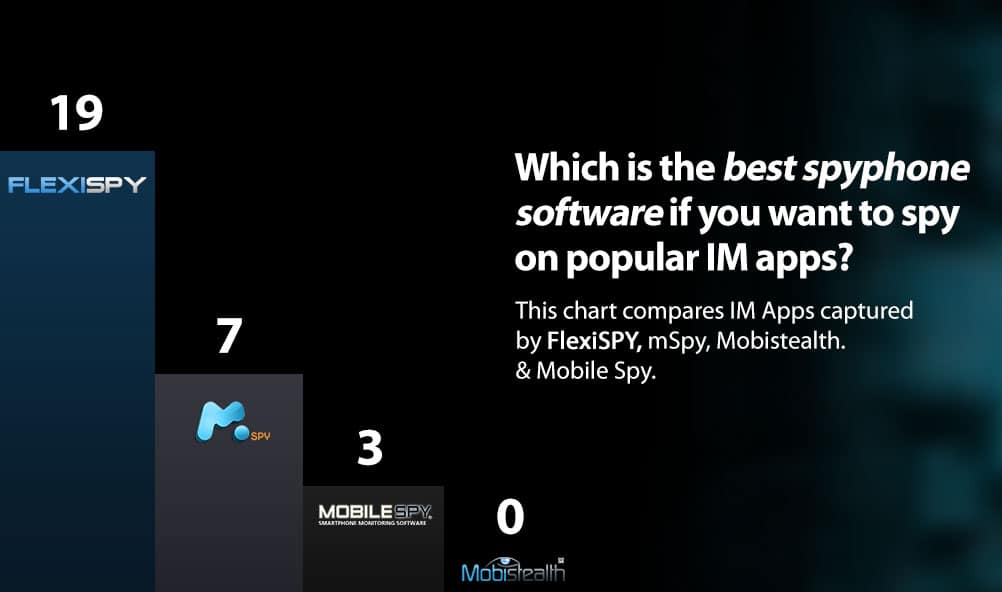
All of our competitors advertise that they capture instant messaging but how do you measure which software actually captures the most instant messaging content for your money?
As the picture to the right shows, with some competitors, important details are missing from the captured Facebook conversation — the missing information could be vital to understanding the whole conversation.
And how do you know what really is the best spy phone software if you want to spy on Whatsapp, Facebook, Viber, Skype, and other popular IM apps?
To answer this, we looked at the competition like mSpy, MobiStealth, and Mobile Spy and counted the actual number of instant messaging apps that they could spy upon.
We looked at how they displayed the data—did they present it the way it was actually displayed on a mobile phone, or did they use a simple grid which makes it hard to understand the flow of the conversation.
We also looked at the ability of FlexiSPY competitors to spy on the rich media like pictures and stickers that are such a cool part of the social messaging experience. To learn more about how we test IM capturing capabilities of ourselves, and our competitors, read our in-depth article on IM testing
The results were obvious.
FlexiSPY supports more social media and instant messaging programs than any other competitor.
FlexiSPY Also Captures The Most Rich Media
IM App
FlexiSPY
mSpy
Mobistealth
Mobile Spy
Facebook
Facebook Messenger
Viber
iMessage
Skype
WeChat
WhatsApp
LINE
BBM
BB PIN
Twitter
Google+ Hangouts
Realistic Conversation View
Yes
KiK Messenger
Telegram
Tinder
Instagram
QQ
Hike Messenger
In our tests, for example, mSpy also failed to capture Facebook stickers and images.
Mobile Spy does not capture emoticons for Whatsapp and Mobistealth failed to capture any IM programs at all.
What’s more FlexiSPY is the only spy phone software which displays the instant messaging conversation inside the online account just like it appears on the actual phone itself.
No other competitor offers this level of detail and compatibility capturing instant messaging, as shown in the detailed chart below.
But rather than resorting to hyperbole or superlatives, we simply look at the facts and can say that when it comes to spying on Facebook, Viber, Whatsapp, Skype, iMessage, BBM, PIN, Wechat, LINE, FlexiSPY is scientifically the most powerful. So why not head back over to the main site and explore everything that FlexiSPY can do for you?
At Flexispy, we are always trying to get consumers the best value for their money. As part of achieving that goal, we actually buy and test all Spyphone software on the market. That way, we can tell customers what they can expect when they purchase any brand of Spyphone software.
One thing we abhor is companies that sell Spyphone apps that plain just don’t work. This makes the entire industry look bad. We want customers to come to us because our products are the best on the market. When customers spend their hard-earned money on something that doesn’t work, that often means they give up, reasoning all Spyphone software is a scam.
With that in mind, we would like to share our experience with one particular brand.
We purchased the software, Cell Spy Stealth, on February 6, 2014 from the website, www.iphone-spy-app.com. The cost was $27.00. When we clicked the button to make the purchase, we were redirected to http://www.cellspymonitoringsoftware.com.
We were intrigued by their website, because they advertise that you can install the software on a target phone, without having physical access to that phone and then intercept any call made or received on the target phone.
After purchasing the software, we downloaded it as instructed, we tried installing it on the android platform, the iOS platform and the Blackberry platform. The installation was unsuccessful on all three. Our company has technicians with years of experience installing Spyphone software onto phones. And, even they couldn’t get this app to work.
As instructed by their website, we submitted a ticket to their support team. We asked for a refund, because the software wouldn’t install. On their website, they guarantee customer satisfaction with the product and promise a full refund if dissatisfied with the product within 30 days of the purchase, no questions asked.
After submitting our ticket for a refund, we received this email from [email protected]
We never heard from them again. Yep, $27 down the drain. What a rip-off! But, you don’t have to kiss your money goodbye. At Flexispy, we’re going to help you get your money back.
How to raise a dispute, and do a chargeback on your credit card
When you purchase any software, take the time to read the legal disclaimer and the terms and conditions of the purchase. It will save you a lot of headaches and disappointment down the road. Here’s the relevant legal disclaimer for our purchase:
Software Download Return Policy: All sales final. In-store credit only.
If there is a problem with the download, please contact us via email for a quick resolution.
Ummmm . . . what happened to my iron-clad 100% money back guarantee?
Never fear. With a credit card purchase, you can always get your money back. It may take a little time, but don’t let the scammers win.
But didn’t the company’s email say that it is illegal to file false and fraudulent chargebacks and disputes with my credit card company?
LOL, the scammers who sold you worthless software and took your hard-earned money are threatening you with legal action if you file a chargeback?
It is your right as a credit card customer to file a chargeback or dispute, if the product you purchased does not conform to your reasonable expectations as a consumer based on the marketing information provided by the seller.
So, here’s what we did to get our money back.
We first contacted our credit card company and informed them that we want to file a chargeback for this purchase. We told them the date and amount of charge. They emailed us a form to complete, which identifies the seller, the charge and the reason for the chargeback. We emailed it back with a copy of our emails with the seller. Our credit card company investigates, tries to get a response from the seller, and then reverses the charge. Simple as that.
But we didn’t stop there.
How to file a complaint with the payment gateway provider
When you purchase something on a website, usually your purchase goes into a shopping cart, and when you checkout to pay, you are taken to a different website, called the Payment Gateway. The payment gateway is the lifeblood of the ecommerce seller, because it processes all its credit card transactions.
Payment gateways carefully watch the number of chargebacks and refunds for credit card transactions that they process, as there can be a risk if the amounts are particularly large. They may close their payment gateway service to the seller, or charge higher transaction fees, if they detect a pattern suggesting potential consumer fraud. Payment gateway providers are particularly interested in refund policies and whether the seller is living up to the refund policy as it is presented to the customer on the seller’s website.
CellSpyMonitoringSoftware uses Plimus as its payment gateway provider. Plimus is a very reputable company, and handles a lot of ecommerce software credit card transactions. Plimus has its own support system for handling complaints that cannot be resolved with the seller.
We submitted our ticket to Plimus’ service center so that we could escalate our request for refund. We do not expect Plimus will be able to get our refund, as that usually has to be obtained through a credit card chargeback. However, we are certain that our email has created a red flag about this seller and that Plimus may take some action as a result of this.
So, don’t accept that the Spyphone software you purchased is just a scam and that you threw away your money. Get your money back through a credit card chargeback and take the seller to task.
After purchasing our iPhone Tracker software, one of the first things you might want to take a look at is the Spy on Call Logs Feature. This feature lets you monitor who they’ve been talking to, by giving you an in-depth and current view of their iPhone call logs. In the following guide, you’ll learn how to start using this feature. So, let’s get started.
Spy On Call Logs – Getting Started
Step 1 – Login to your FlexiSPY Dashboard via the Portal
Step 2 – Click the Calls tab and then click Phone.
Step 3 – View the call logs captured by FlexiSPY listed for your viewing.
Done
That’s all there is too it, and you should now successfully be monitoring their call logs. Depending on your automatic upload settings, the call logs will update every time a call takes place, you’ll see the contact name, phone number, call duration, and date & time. This really does give you a good view into what they’ve been up to. So head over to our iPhone Tracker page and see all of the great monitoring abilities that FlexiSPY gives you.
If you have any questions about this feature, or any other FlexiSPY feature, feel free to let us know in the comments section below, or through our social media!
There are many reasons an employer may want to use GPS location tracking technology to monitor the whereabouts of its employees.
These are some examples of where GPS tracking might provide some degree of help in the workplace:
You suspect an employee of misusing company time to conduct personal business;
You suspect an employee is engaged in illegal behavior, such as pilferage or drug use;
You suspect an employee is misusing company paid sick leave;
You suspect an employee of misappropriating company secrets or colluding with a competitor;
You are concerned about whether an employee is on a personal diversion rather than his appointed task when using his personal vehicle.
These however, are only a few examples of where an employer may consider engaging in Geo-location to confirm reasonable suspicions about a particular employee.
The question then arises, what can the employer legally do to obtain some evidence to confirm these suspicions?
For company-owned vehicles, the law is clear that an employer may put a GPS tracking device on the vehicle. The company-owned vehicle is the employer’s property, and its use for a business purpose is an extension of the workplace.
In O’Connor v. Ortega 480 US709 (1987), the US Supreme Court held that workplace searches never require a warrant. Also see, Matter of Caruso v. Ward72 NY2d 432 (1988)(applying New York law, random workplace drug testing does not require a warrant).
But what about placing a GPS tracking device on an employee’s personal car? Is this ever legal? What restrictions and limitations apply?
Employers now have guidance in this matter.
In Cunningham v. New York State Dept. of Labor (2013 NY Slip Op 04838), New York’s Appellate Division heard a case in which the employee was subjected to discipline based on evidence obtained through the use of a GPS tracking device installed on his personal car.
Michael Cunningham worked in the state’s department of labor in a management position. He was a 20-year veteran of the department and much of his work was performed either in the field or in remote locations.
His employer suspected that he was submitting false time reports and taking unauthorized absences. They believed he was claiming he was on extended business trips, when he had actually returned home much earlier than his timesheets showed.
The employer hired an investigator to follow his car to confirm their suspicions. Cunningham was successfully able to elude the tailing investigator several times. Thereafter, the employer attached a GPS tracking device to the wheelbase of Cunningham’s personal car, without Cunningham’s knowledge.
The employer tracked the movements of Cunningham’s car for one month. During that time period, the GPS tracking device required two replacements. Through the evidence obtained by the tracking device, the employer brought disciplinary charges against Cunningham which resulted in termination of his employment.
The reviewing court found that the use of GPS tracking device to confirm suspicions about Cunningham’s absences and timekeeping records was reasonable. It further held that tracking the car’s movements for one month was a reasonable length of time.
However, the court also ruled that the search was excessively intrusive. Because the employer was tracking the movements of Cunningham’s car 24/7, and this would include considerable time periods when Cunningham made no claim that he was working, the search exceeded its permissible scope. The employer, who replaced the GPS device twice during the surveillance, could easily have removed it when Cunningham took a personal vacation. The court found that the employer failed to make a reasonable effort to avoid tracking Cunningham when he was outside of business hours.
Generally, New York’s privacy protection with respect to GPS tracking is stated broadly in its State Constitution. The right of the people to be secure in their persons, houses, papers and effects, against unreasonable searches and seizures, shall not be violated, and no warrants shall issue, but upon probable cause, supported by oath or affirmation, and particularly describing the place to be searched, and the persons or things to be seized. NY State Constitution, Article I, Section 12
In Cunningham, New York’s appellate division concluded that the placement of a GPS tracking device on an employee’s personal car is not subject to the constitutional warrant requirement, because a personal car which is used in any way for a business purpose is an extension of the workplace.
Thus, the court has distinguished the employment setting from the police investigation setting. Cf People v. Weaver, 12 NY3d 433, 447(2009)(holding the attachment of a GPS tracking device to a suspect’s car always requires a court-issued warrant supported by probable cause). United States v. Jones 132 S.Ct. 945 (2012)(holding attachment of GPS tracking device to a suspect’s car is a trespass and requires a warrant.) Interestingly, that distinction means the case is inapplicable to other GPS tracking technology, such as mobile phone GPS tracking applications.
Yet, an employer who has reasonable grounds to use location tracking technology on the employee’s car, must monitor with reasonable care. Constant tracking of an employee’s car is liable to violate the employee’s right of privacy.
Security companies that manufacture GPS tracking devices would be wise to design the device so as to allow employers to turn the monitoring function off during non-working hours and weekends. This would avoid the Cunningham situation, where the employer’s reasonable use of the GPS tracking device was made unreasonable by being overly intrusive into the employee’s private life – the employee’s off-work hours.
As an employer, if you are going to use GPS tracking devices, you should make sure that the device has a scheduler and that your HR department creates a policy that the employer will reasonably refrain from using GPS tracking during off-work hours.
You should also make sure that your HR department thoroughly documents any targeted GPS location tracking of an employee’s personal car. They should detail the suspicion that surrounds the employee’s conduct, why less intrusive means of investigation would not be effective, and the proposed limits of the surveillance that will be used during the investigation of the employee.
After making your purchase of our iPhone Tracking Software, you’ll be able to spy on iPhone pictures with our Image Capture feature. This guide shows you the steps needed to get started.
Getting Started
Step 1 – Login to your FlexiSPY Dashboard via the Portal.
Step 2 – Click the Control Center tab, then click Photo Controls.
Step 3 – Click Historical Media
Step 4 – Set Get Image to On.
Step 5 – Click Sync Now.
Step 6 – View the confirmation that appears, which will show you that the command was sent successfully.
Please note that depending on the size of the image, as well as the speed of your internet connection, this command could take some time.
Step 7 – Click on the Media tab and then click Photos.
Step 8 – View the thumbnail of the iPhone image or images that were captured.
Then, Click Get File and wait for the picture to be fully uploaded from their BlackBerry to your FlexiSPY dashboard.
Next, Click Get Photos to start the image upload process.
Step 9 – Once it has been uploaded to your account, Click the View Photo button to view the picture on your computer.
The Picture will then be displayed in full size.
Done
That’s all there is too it, and you should now successfully be using FlexiSPY’s Image Capture feature for iPhone to spy on their pictures.
Of course if you still have questions about this feature, or any other feature, feel free to let us know in the comments section below, or through our social media!
There is nothing worse than installing spy software on to an iPhone that advertises itself as being hidden, only to find out later that the software was not as hidden as it should be, and the iPhone user found it.
This article will show you how FlexiSPY has been designed to be completely hidden once you have installed it on to an iPhone.
An iPhone has two main areas that can lead to being discovered if the spy phone software is not hidden as advertised.
The first is that an iPhone must be jailbroken before you can install any spy phone software on to it.
What does this mean?
Jailbreaking an iPhone gives you access to far more configuration options and allows you to install a greater range of software, including any iPhone spy software.
But it also means that after you have jailbroken the phone a new icon will appear for the Cydia program, the iPhone user will see this icon and know that something on their phone has changed.
They can then open Cydia and see if anything unfamiliar has been installed.
Anything that they see which is unfamiliar to them they can easily remove in a single tap, this includes the spy phone software you just installed.
That is why FlexiSPY is not visible in the two main areas that we have already discussed.
How does FlexiSPY do this?
First FlexiSPY removes all traces of itself from inside Cydia.
The iPhone user will not see that anything unfamiliar or new has been installed, if the iPhone was already jailbroken.
Secondly, FlexiSPY also hides the Cydia icon after it has been installed.
Now that FlexiSPY has hidden Cydia the iPhone user will never know that it had been jailbroken or that any iPhone spy software has been installed
So if you want serious iPhone spy software that really cannot be found after installation then FlexiSPY has you covered.
Included in our iPhone Tracking Software is the ability to monitor their phone surroundings using our Ambient Recording feature. In the following guide you’ll see the steps needed to do so. Let’s get started.
Getting Started
Step 1 – Click the Control Centre tab and then click Call Controls.
Step 2 – ClickStart Ambient Recording, then Click and drag the slider to set the duration of recording (from 5 minutes up to 60 minutes only).
Step 3 – ClickStart Ambient Recording Now.
The recording will start one hour after the Start Ambient Recording Now button is clicked and it will record for the duration that was specified
Please remember that the time it then takes to upload the recording to your FlexiSPY dashboard depends on the internet connection speed on their Symbian Belle phone so it may take time.
Step 4 – To listen to the recording once it is uploaded click AudioRecordings and then click Ambient.
Step 5 – The ambient recording file will be listed.
Step 6 – Click Download to download the file to your computer to listen to
Step 7 – The recording will start to play on your computer
Done
That’s all there is too it, and you should now successfully be spying on iPhone surroundings with our Ambient Recording feature.
Of course, if you have any questions about this feature, or any other FlexiSPY feature, feel free to let us know in the comments section below, or through our social media!
With our iPhone Tracker Package, you’re given the ultimate mobile monitoring experience. Included in the package is the ability to track iPhone GPS Locations, you’re able to easily see where they are, and where they have been, all from the convenience of your dashboard.
In the following guide, you’ll learn how to use FlexiSPY’s GPS Tracking Feature – let’s get started!
Getting Started
Step 1 – Login to your FlexiSPY Dashboard via the Portal.
Step 2 – Click the Locations tab.
Step 3 – The latest GPS location captured by FlexiSPY will be listed for you to view.
Done
That’s all there is too it, and you should now successfully be tracking their iPhone GPS location.
Of course, if you have any questions about this feature, or any other FlexiSPY feature, feel free to let us know in the comments section below, or through our social media!